
How to Do the Dog Elevator Prank AI Video From One Photo
Star in the dog elevator prank meme with one photo: the trend explained, how the AI version stages the dog, exact steps, costs and safety boundaries.
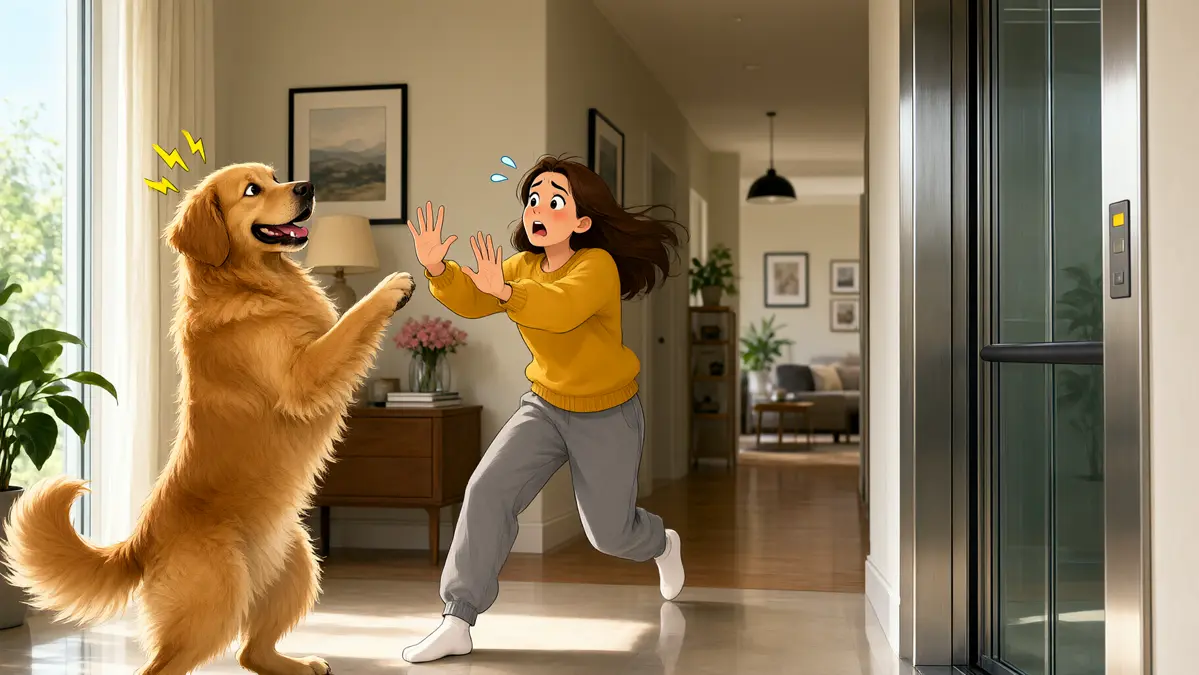
Yes — you can star in the dog elevator prank video with one photo and zero actual dogs. The trend format: a home hallway, a glass elevator, and an enormous overenthusiastic dog that stands up, leans on you with full body-weight love, and "chases" you backwards into the elevator while you wave it off in comic panic. Upload one photo of yourself and the generator stages the whole scene — you, the hallway, the glass elevator and the giant dog — as a vertical 9:16 MP4, 5 to 10 seconds long.
This guide covers what the trend is, how the AI version works, the steps on the Dog Elevator Prank page, costs, and the safety boundaries that matter.
What is the dog elevator prank trend?
The format comes from real home-doorbell-camera-style clips of big dogs greeting people with too much enthusiasm — the "giant dog won't let me leave" comedy that pet accounts run on constantly. The specific elevator staging (hallway, glass lift, person retreating while the dog insists) turned it into a meme template, with caption formats like "3 hours of sleep doesn't affect me / Also me:" doing the setup work.
The AI version removes the need for: a giant dog, a glass elevator, a hallway camera, and the cardio. One photo of you is the entire input; the dog, the setting and the staging are generated.
Two honest notes before you start:
- Write your own caption. The meme's original burned-in captions are deliberately not reproduced in generations (copying them makes clips look like recycled template content — and this site's prompt excludes burned-in text). Your own caption is funnier anyway; the scene carries the visual joke.
- The dog is friendly, full stop. The prompt explicitly forbids biting, scratching, fear or injury — the dog's bit is overbearing affection, not aggression. If you want a horror dog, that's a different genre and not this scene.
How the AI version works from one photo
- Your photo is the star. One person, clear front-facing face (JPG/PNG/WebP, up to 10 MB). The generator reads your identity and places you in the hallway scene.
- The dog is generated staging. A large dog character performs the lean, the insistence, the follow — choreographed to the prepared reference that defines the prank's beats.
- You are never touched. This is a comedy of invasion of personal space, staged entirely by AI; nothing contacts anyone.
- Single-person scene. The original meme clips sometimes have a second person filming; this scene is built as one person (you) plus the dog.
Limits: fast cross-body motion (yours and the dog's) is where AI video drifts most — check faces and paws in the result before posting. Identity is requested, not guaranteed.
Step by step: making your dog prank video
- Preview free. Open the Dog Elevator Prank generator and watch the examples — no account needed. You'll see the exact hallway, elevator and dog staging.
- Upload your photo. Sharpest available, front-facing. Casual clothes fit the "just got home" energy of the bit.
- Choose the length — 5, 8 or 10 seconds. The full gag (lean → retreat → wave-off → collapse into the elevator) reads best at 8–10 seconds.
- Pick 480p (default), 720p or 1080p and read the credit quote for your combination before generating.
- Generate, review, download. Allow five minutes or more. Check your face and the dog's paws mid-action, then download the watermark-free MP4 and post with your own caption.
How much does it cost?
Pay-per-video with the quote shown before you generate; one-time credit packs, no subscription; free example watching without an account. A technical failure returns credits automatically; a finished video you dislike is charged — a re-render is a new paid attempt. The category's watermark and subscription trade-offs are compared in the no-watermark guide; this site adds no watermark by design.
Six caption directions for the prank
- The exhaustion frame. "3 hours of sleep doesn't affect me" energy — your own version: "Me after one (1) social event."
- The reluctant love frame. "I said five minutes of cuddles. He heard forever."
- The gym substitute. "My cardio is fending off 40 kilos of hello."
- The roommate POV. "This is why I'm never on time."
- The dog's POV. "The human tried to leave. Unacceptable."
- The pet-parent confession. "I don't need an alarm system. I have enthusiasm."
(Write your own — don't reuse the original meme's burned-in text; fresh captions also keep your clip out of "recycled template" territory.)
FAQ
Do I need a photo with my dog?
No — no dog is needed at all. The dog is generated. You upload exactly one photo: you.
Can I generate my actual dog?
Not in this scene — the dog character is staged by the reference, not read from a photo. It's a generic big friendly dog.
Is the dog dangerous? Is anyone hurt?
No — the prompt explicitly forbids biting, scratching, fear and injury. The gag is overwhelming friendliness; nobody is touched, and nothing is real.
Why is there no second person like in some clips I've seen?
The scene is staged as one person plus the dog. Two-person formats exist elsewhere on the site — like the Christmas duet or the elevator meet-cute.
How long can the video be?
5, 8 or 10 seconds. The full retreat-and-wave-off beat needs at least 8 seconds to land cleanly, so the 8 and 10 second cuts are the ones to quote when you're planning captions around the collapse-into-the-elevator ending.
Where do I start?
Open the Dog Elevator Prank page, watch the free examples, upload your photo. For the broader category — tools, costs, honest limits — start with How to Make an AI Dance Video From a Photo or browse the main studio.