
How to Do the Fancy Cafe AI Trend (POV Video From One Photo)
Do the fancy cafe AI trend from one photo: the POV 'first time in a fancy cafe' clip explained, with exact steps, costs, lengths and posting tips.
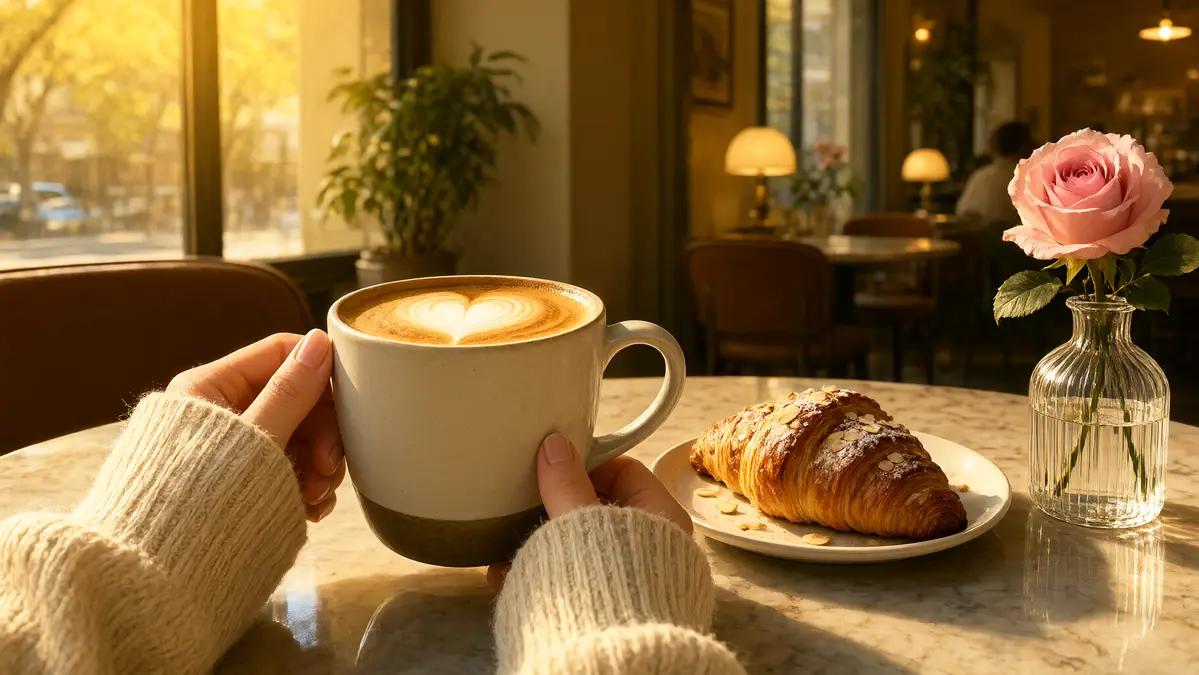
Yes — you can do the fancy cafe AI trend with one photo. The format is a first-person POV clip: your hands wrap around an elegant latte, a marble table, golden afternoon light, a pastry that costs more than lunch — the "POV: your first time in a fancy cafe" moment, generated as a short vertical video from a single still photo.
Here is what the trend is, how to make yours on the Fancy Cafe AI page, and everything to know before you post.
What is the fancy cafe AI trend?
The fancy cafe trend belongs to the "POV lifestyle" family of AI videos: instead of dancing, the camera is you — hands, cup, table, light. The clip parodies (or celebrates) that slightly self-conscious feeling of sitting in an over-designed cafe, and it works as a gentle joke about treating yourself. It spread through 2025–2026 alongside other POV formats because it needs zero performance from the subject: the scene does everything.
Because the reference clips often carry a burned-in caption like "POV: Your first time in a fancy cafe", a proper generator must strip that caption and rebuild the scene — the Fancy Cafe AI generator is explicitly prompted never to reproduce any text, caption, logo or watermark from the reference.
How to make your fancy cafe POV video
Five steps:
- Preview free. The scene page shows example videos with no account — the exact table, cup and light you'll get.
- Upload one photo (JPG/PNG/WebP, up to 10 MB): one person with a clear face. The scene is first-person, so your subject's hands and presence carry the POV; their own outfit stays.
- Choose the length — 5, 8, 10, 12 or 15 seconds. POV clips hold attention well at 8–10 seconds.
- Pick the resolution — 480p (default), 720p or 1080p — and read the credit quote shown before generating. Examples are free; generation uses one-time credit packs (see pricing).
- Generate, check, download. Allow five minutes or more. POV hands-and-cup scenes are technically demanding: inspect the fingers and the cup handle before posting — hands are where AI video most often slips.
What does it cost and what do you get?
- Input: one photo of one person — JPG, PNG or WebP, max 10 MB.
- Model: Wan 3.0 reference-to-video (your photo + the prepared cafe reference).
- Output: vertical 9:16 MP4, no watermark added (the prompt explicitly excludes captions, logos and watermarks).
- Cost: credits quoted up front for your exact length/resolution; one-time packs, no subscription. Watching examples is free.
- Failures: a technical failure or cancellation returns credits automatically. A finished result you dislike is charged — that's the pay-per-video trade-off, stated plainly.
- Privacy: uploads and finished videos stay in private storage; nothing is added to a public gallery (details in the privacy policy).
Why POV scenes are the safest first AI video
If you've never generated an AI video of yourself before, POV formats are the gentlest start:
| Concern | Dance scene | POV cafe scene | | --- | --- | --- | | Face fidelity pressure | High — the face is on screen the whole time | Low — first-person framing de-emphasizes the face | | Motion complexity | Full-body choreography | Hands and small movements | | "Is that really you?" reactions | Immediate | Delayed — the joke lands first | | Photo requirements | Front-facing, sharp face matters a lot | More forgiving |
Dance scenes reward performers; POV scenes reward captions. Pick by personality, not by trend pressure.
Five posting tips
- Write the caption before you render. The trend is 60% caption: "POV: you said 'just a coffee' and the menu had no prices" — decide your joke, then make the clip match.
- 8–10 seconds is the sweet spot. Long enough to establish the luxury, short enough to loop.
- Muted mellow audio fits. Generated cafe ambience is fine; trending soft tracks also work.
- Disclose AI content where the platform asks.
- Check the hands. Every POV clip lives or dies on believable hands — review before posting, re-render if needed.
Variations worth trying
The cafe scene's joke is "luxury through my own eyes", and that frame adapts to a lot of situations. Five caption angles that work with the same generated clip:
- The budget reveal. "POV: the latte costs more than your weekly coffee budget" — the clip supplies the evidence, the caption supplies the verdict.
- The special occasion. "POV: you finally said yes to the pastry" — works especially well with a photo of someone who never treats themselves.
- The tourist bit. "POV: your first afternoon in a city where every cafe looks like this" — pairs naturally with a travel photo.
- The role reversal. Generate it with a parent's or grandparent's photo: "POV: mom discovers aesthetic cafes" — gentle, affectionate, very shareable in family group chats.
- The loop. "POV: you've been 'about to leave' for 40 minutes" — the calm 10–15 second cut supports the bit perfectly.
One honest note: like every AI scene on this site, the cafe is fictional and generated — no real venue is depicted, and the trend works precisely because viewers recognize the feeling of the scene, not a specific place. Keep photo permissions in mind too: only use pictures of people who agreed to be in your bit, per the terms.
FAQ
Whose hands appear in the video?
Your subject's, generated from their photo — the model keeps their identity cues while the reference provides the table, cup and framing. The scene stays first-person; no other person's face appears.
Do I need a photo of a cafe?
No. The cafe setting is generated from the prepared reference. Your photo only needs one person with a clear face.
How long can the video be?
5, 8, 10, 12 or 15 seconds on this scene — one of the few scenes supporting the full range.
Can I add my own text caption into the video?
The generator deliberately excludes burned-in captions (they make clips look like recycled template content). Add your caption in the TikTok/Reels editor instead — that also lets you A/B two captions on the same clip.
Where do I start?
Open the Fancy Cafe AI page, watch the examples, upload your photo. For the general background on photo-to-video, see How to Make an AI Dance Video From a Photo or browse the main studio.