
How to Do the Vossi Bop AI Trend From One Photo (Guide)
One photo becomes a suited bridge dance: the Vossi Bop AI trend explained — the move, the suit, the steps, costs, lengths and the no-artist boundaries.
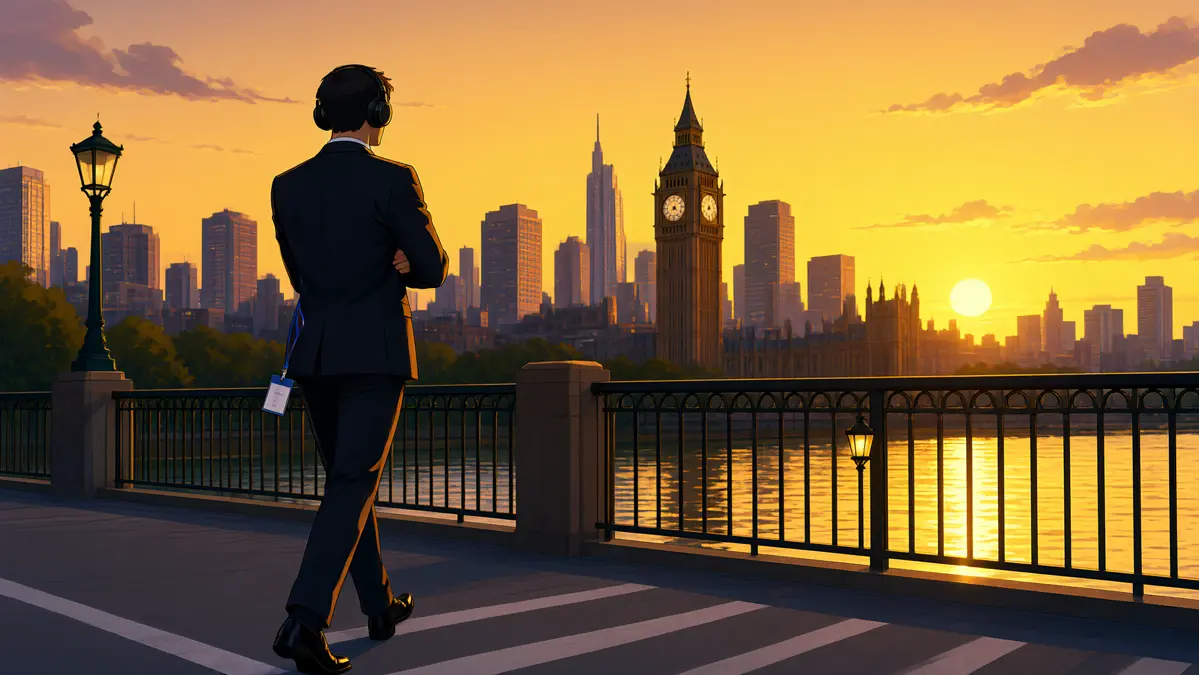
Yes — you can do the Vossi Bop AI trend with one photo. Upload a single picture of yourself, and the generator puts you in the trend's signature setting: a suit with a white shirt, tie, headphones and a work badge, dancing on a riverside bridge at dusk with a city skyline behind you. The camera swings around from behind your shoulder to a front view while you run the routine — arms up, low side-step, the arms-crossed chest move that defines the dance, a bouncing sidestep, and a final arms-wide pose to camera. The output is a horizontal 16:9 MP4, 5 to 15 seconds long.
This guide covers the move itself, the exact steps on the Vossi Bop AI page, costs, and the boundaries that keep the recreation clean.
Where does the Vossi Bop trend come from?
The Vossi Bop is a dance that went with a 2019 UK chart-topping single of the same name — a jaunty, arms-driven routine that became a TikTok challenge, often performed in unlikely places and unlikely outfits. The format's lasting image is exactly what this scene recreates: an ordinary person in office clothes doing the confident little routine outdoors like it's the most natural thing in the world, bridge skyline optional but heavily encouraged.
Two boundaries this site keeps, and you should expect any honest tool to keep:
- No artist imitation. The prompt explicitly forbids imitating or naming any rapper, recreating the official music video, or copying its shots. Your dancer is the person in your photo, doing an original take on the trend's signature move — not a likeness of any performer.
- A generic skyline. The bridge setting is a stylized riverside cityscape, not a precise replica of any specific landmark. The vibe is London-dusk; the geometry is its own.
Song rights are separate from your photo rights: the generated video carries its own scene audio, not the track. Attach a platform-licensed sound when posting, same as every trend clip.
What you need before you start
- One photo of one person. JPG, PNG or WebP, up to 10 MB, clear front-facing face. The suit, tie, headphones and badge are supplied by the scene — come as you are.
- Permission. The photo's person becomes the dancer; use only photos you're allowed to use.
- A free account to generate. Watching the example videos needs no account; generating requires one because credits are tracked per user.
The suit is the joke, so don't overthink the source photo — gym clothes in, suit out.
How to make your Vossi Bop video, step by step
- Preview the scene free. Open the Vossi Bop AI generator and watch the examples — no account needed. You'll see the full routine: the arm sequence, the crossed-chest signature, the camera swing from behind to front.
- Upload one photo. Sharpest available, front-facing. The generator reads identity from the face and stages everything else.
- Choose the length — 5, 8, 10, 12 or 15 seconds. The complete routine (full arm sequence plus final pose) wants 12–15 seconds; the 5-second cut is a punchy loop of the signature move.
- Pick 480p (default), 720p or 1080p and read the credit quote shown for your exact combination before generating.
- Generate, review, download. Allow five minutes or more, longer when the queue is busy. Check the face during the camera swing and the arms mid-sequence (crossed-arm moves are where AI hands drift), then download the MP4 — no watermark is added — and post.
How much does it cost?
Pay-per-video, quoted up front: the generator displays the exact credit cost for your chosen length and resolution before you commit. Credits are one-time packs — no subscription, nothing renews. Watching examples is free without an account. A technical failure returns the charged credits automatically; a completed video you dislike is charged, and a re-render is a new paid attempt. The category's wider pricing landscape — weekly subscription apps and watermarked free tiers — is compared in the general guide and the no-watermark guide.
Why the suit matters (casting notes)
The trend's comedy engine is context collapse: office wear plus full commitment outdoors. Casting notes that ride it:
- The more corporate the better. The scene supplies the suit; your subject supplies the attitude. Grandparents in the full kit are the format's sweet spot.
- Cast the person who never dances. The gap between their usual energy and the routine's confidence is the content.
- Post-work framing works. "Straight from the desk to the bridge" captions write themselves.
- Horizontal is the differentiator. This is a 16:9 scene — it fills desktop feeds and stands out among a wall of vertical clips, like the elevator meet-cute and the yacht deck dance.
Five posting tips
- Caption the context collapse. "Friday at 5pm, apparently" — the suit does the setup.
- Use licensed audio. The track's rights aren't included; in-app sounds complete the bit.
- Check the crossed-arms frame. Pause on the signature move — if the hands read clean there, post it.
- Disclose AI content where the platform expects it.
- Mind the artist boundary in captions too. Describe the trend, not the performer — your clip is an original homage, not an impersonation.
FAQ
Do I need a photo in a suit?
No — one ordinary photo is enough. The suit, tie, headphones, badge, bridge and dusk skyline are all generated.
Is this the official dance or music video?
No. The prompt explicitly excludes imitating any rapper and recreating the official video. It's an original take on the trend's signature routine, with your photo's person as the dancer.
Why is the video horizontal?
16:9 matches the scene's cinematic bridge framing — the camera swing reads better wide, and horizontal clips stand out in vertical feeds.
How long can the video be?
5 to 15 seconds. The full routine with the final arms-wide pose fits the 12–15 second range.
Where do I start?
Open the Vossi Bop AI page, watch the free examples, upload your photo. For single-photo alternatives — the living-room dunk, the street party — browse the main studio or read the general photo-to-video guide.