
How to Make a Lil Yachty Walkout AI Video From One Photo
One photo becomes the hardest walkout ever: the festival entrance AI trend explained, exact steps, costs, lengths and the no-artist boundaries that matter.
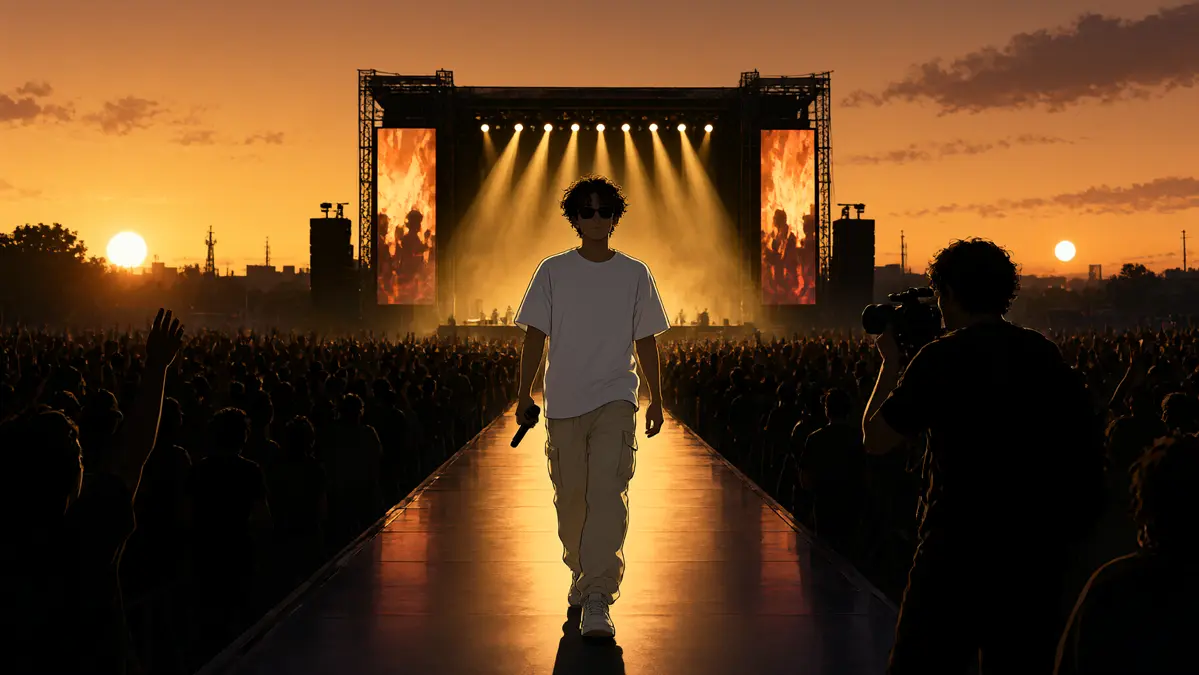
Yes — you can make the "hardest walkout ever" AI video with one photo. Upload a single picture of yourself, and the generator stages the full festival-entrance sequence: you step out of the backstage dusk in sunglasses and an oversized white tee, microphone in hand, a gimbal cameraperson walking backwards in front of you, crowd silhouettes with raised arms on both sides, stage beams cutting the haze — a 5 to 15 second vertical 9:16 MP4 of pure main-character energy.
This guide covers the trend, the steps on the Lil Yachty Walkout AI page, costs, and the boundaries this scene is built around.
What is the walkout trend?
The format comes from one of 2020s live music's most-memed moments: an artist's festival entrance so theatrically confident it became "the hardest walkout ever," spawning an AI template wave where anyone inserts themselves into the same entrance arc — backstage, runway, crowd, glory. Generator tools across the category (Kapwing, MakeViral, Media.io and others) now host versions of it; the entrance is short, the swagger is total, and the format is tailor-made for one photo.
Why it works: the walkout is pure context. No dance skills, no lyrics, no performance — just a person walking like the world owes them a stage. That makes it the lowest-effort, highest-attitude format in the whole AI-trend family: if you can be photographed, you can headline.
The boundaries (this scene's rules are worth knowing)
The source meme involves a real, living artist — so this scene draws its lines explicitly in the prompt:
- No artist imitation or attribution. The prompt excludes imitating or naming any real performer. Your walker is the person in your photo — same swagger, zero likeness claims.
- No real festival recreation. The stage, crowd and venue are generated and generic; the prompt forbids recreating any real event or stage branding.
- Song rights separate. The generated video carries its own scene audio. Attach a platform-available track when you post.
The result: you get the entrance fantasy without the identity claims that get clips pulled. It's the same boundary set as the Vossi Bop scene — vibe preserved, artist untouched.
What you need before you start
- One photo of one person. JPG, PNG or WebP, up to 10 MB, clear front-facing face. Sunglasses and the oversized tee are supplied by the scene — come as you are.
- Permission. Whoever is in the photo becomes the headliner; use photos you're allowed to use.
- A free account to generate. Watching the examples needs no account; generating requires one because credits are tracked per user.
Step by step: making your walkout
- Preview the scene free. Open the Lil Yachty Walkout AI generator and watch the examples — the dusk light, the cameraperson's reverse-walk, the crowd arms.
- Upload one photo. Sharpest available, front-facing face.
- Choose the length — 5, 8, 10, 12 or 15 seconds. The full entrance arc (backstage → runway → crowd) wants 10–15 seconds; five seconds is a pure-attitude loop.
- Pick 480p (default), 720p or 1080p and read the credit quote shown for your exact combination before generating.
- Generate, review, download. Allow five minutes or more, longer when busy. Walking motion is kind to faces but check the crowd hands and the microphone grip, then download the watermark-free MP4 and post.
How much does it cost?
Pay-per-video, quoted up front; one-time credit packs, no subscription; free example watching without an account. Technical failures return credits automatically; a finished-but-imperfect result is charged, and a re-render is a new paid attempt. Category pricing trade-offs — subscriptions and watermarked free tiers — are compared in the general guide and the no-watermark guide.
Six casting and posting ideas
- The colleague. The person who walks to the coffee machine like it's a runway. "Monday, apparently."
- The graduate. A walkout for the diploma photo — "the hardest walk to the stage ever."
- The dad. Dads doing festival entrances are the format's wholesome apex. "He's been rehearsing in the driveway."
- The pet's human. Caption from the dog's POV: "Where he goes at 6am, apparently."
- The birthday star. Entrance-before-cake — the group chat will demand one every year now.
- The gym regular. "How I enter the gym in my mind."
Two posting constants: caption the confidence without naming any artist (your clip is a format homage, not an impersonation), and disclose AI content where the platform expects it.
FAQ
Is this the actual artist or his real walkout?
No — the prompt explicitly excludes imitating, naming or recreating any real performer or event. It's the format of the legendary festival entrance, staged with your photo's person as the star.
Do I need a photo in sunglasses or stage outfits?
No — one ordinary photo. The sunglasses, oversized white tee, microphone, runway, crowd and dusk lighting are all generated by the scene, so your everyday portrait becomes a festival headliner.
How long can the video be?
5 to 15 seconds. The complete entrance arc — backstage doorway, reverse-walking cameraperson, runway, crowd — fits 10–15, while five seconds is a tight attitude loop that replays well on stories.
Why is walking safer than dancing for AI video?
Walking is periodic, predictable motion — models render it more consistently than fast choreography. Faces stay steadier and limbs drift less, which makes walkout clips one of the most reliable formats in the family, and the reason the entrance scene takes almost any clear photo.
Where do I start?
Open the Lil Yachty Walkout AI page, watch the examples, upload your photo. More single-photo scenes — the living-room dunk, the suited bridge dance — are in the main studio, or read the general photo-to-video guide first.