
How to Make a Flamingo Float AI Video (Rooftop Pool Trend)
How to make a flamingo float AI video from one photo: the rooftop pool trend, exact steps, costs, lengths and posting tips for a vertical MP4.
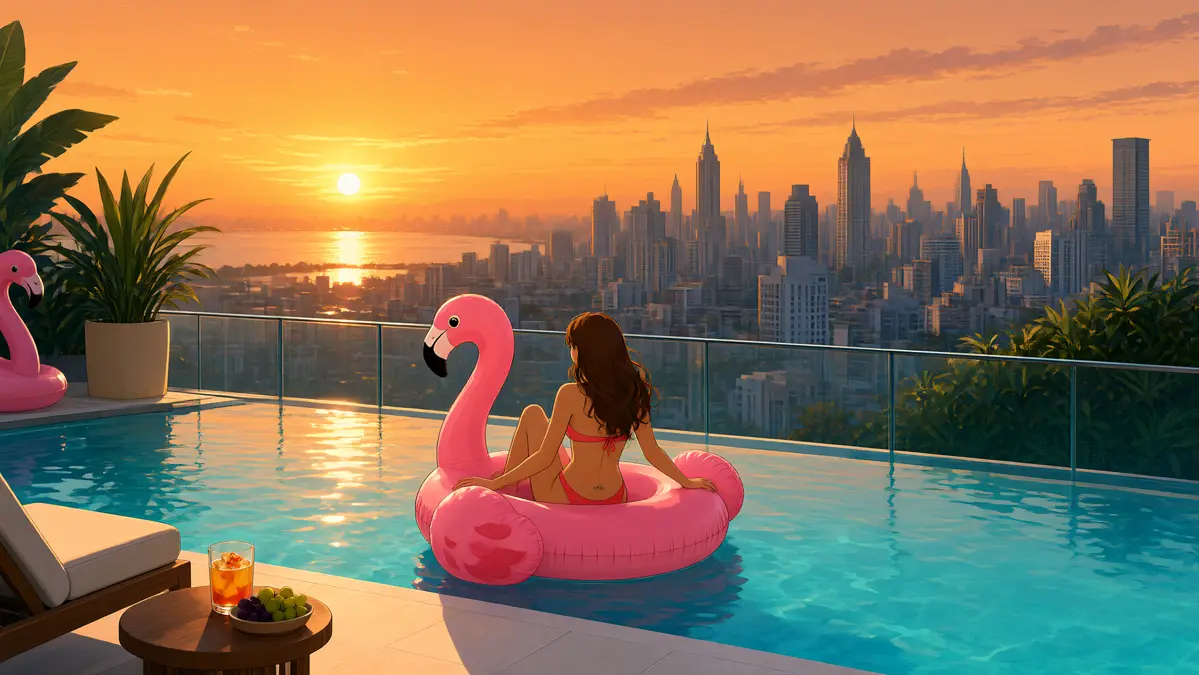
Yes — you can make a flamingo float AI video from one photo. Upload a single picture of a person, and the generator places them drifting on a pink flamingo float in a rooftop infinity pool: skyline behind, water rippling, the subject lounging like it's the most normal thing in the world. The clip comes out as a vertical 9:16 MP4 ready for TikTok, Reels or Shorts.
Here is what the trend is, how to make yours on the Flamingo Float AI page, and what to know before you post.
What is the flamingo float AI trend?
The flamingo float trend is one of the 2026 "unexpected luxury" AI video formats: instead of dancing, the subject simply exists somewhere aspirational — in this case floating on an inflatable flamingo in a rooftop infinity pool. The format works because it needs nothing from the subject: no dance skills, no expressions, just one clear photo. That also makes it the friendliest AI video trend for people who "can't" be in trend videos.
Search interest for the format lands directly on template pages — several generic AI-video sites now ship a "flamingo float" template — but almost no tutorial content exists yet for the trend itself. If you've seen one of these clips and wondered "how did they do that?", this guide is the answer.
How to make your flamingo float video
The Flamingo Float AI generator turns your photo into the float scene. Five steps:
- Preview the scene free. The page shows example videos with no account — watch them to see the exact pool, framing and float motion.
- Upload one photo (JPG/PNG/WebP, up to 10 MB): one person, clear front-facing face. Casual summer clothing matches the scene best; the model keeps your subject's own outfit rather than inventing swimwear.
- Choose the length — 5, 8 or 10 seconds. The floating motion is gentle and loopable, so even the 5-second cut reads well on a feed.
- Choose the resolution — 480p (default), 720p or 1080p — and read the credit quote shown before generating. Examples are free to watch; generation uses credits from one-time packs (see pricing).
- Generate, check, download. Allow five minutes or more. The result is a water-and-sky scene, so look at the face and the hands on the float; water distortion is where AI video most often slips.
What does it cost and how long does it take?
- Cost: credits quoted up front for your exact length/resolution choice; one-time packs, no subscription. Watching examples is free without an account. Technical failures return credits automatically; a finished-but-imperfect result is charged.
- Time: usually five minutes or more per video, longer when the queue is busy.
- Watermark: none added — the prompt explicitly excludes captions, logos and watermarks.
- Output: vertical 9:16 MP4 at 480p/720p/1080p.
Why choose the float scene over a dance scene?
Both start from the same one-photo upload, so the choice is about the person in the photo:
| If your subject… | Better scene | Why | | --- | --- | --- | | Loves attention, dances at parties | Charme street party | Full choreography and crowd reaction | | Is camera-shy, older, or "too cool" | Flamingo float | Zero performance needed — lounging is the whole bit | | Is half of a duo | 24k Magic deck dance | Two-friends groove format |
The float scene is also the safest choice for photos of grandparents or pets-in-arms — gentle motion means fewer chances for AI to mangle hands and faces.
Five posting tips
- Lean into the caption contrast. "POV: you said 'one more drink won't hurt'" — the humor is the situation, not the subject.
- Loop it. The 5- or 8-second cut loops almost seamlessly; looping clips hold retention.
- Pair with chill audio. The generated scene sound is ambient; trending mellow tracks fit the float mood.
- Disclose AI. Label AI-generated content where the platform asks for it.
- Keep the original photo rights clean. Only use photos you have permission to use — the terms require it.
Variations worth trying
The float scene is flexible enough to carry different jokes. Five angles that work with one photo each:
- The "do not disturb" postcard. Your subject floating with complete serenity — caption it as an out-of-office reply. The 10-second cut gives the calm time to land.
- The family group chat bit. Generate the same photo twice at different lengths, post them as "me planning the vacation" and "me on the vacation".
- The pet arm float. A photo of someone holding a small pet reads as "first trip together" — check the pet's paws in the result before posting.
- The retirement announcement. A grandparent's photo plus a calm caption is a genuinely wholesome use of the format, and gentle motion suits older subjects.
- The reaction loop. Post your float clip, then film your real reaction watching it — two-part posts ride the trend twice.
Each variation is still one photo, one scene, one generation — the difference is entirely in the caption and the photo you choose. If a variation needs two people in frame instead, switch to the two-photo studio rather than forcing this scene beyond one subject.
FAQ
Do I need a photo in a swimsuit?
No. The model reads identity and outfit from your photo and places that person on the float. Everyday clothing works; the generated scene does the vacation work.
How long can the video be?
5, 8 or 10 seconds on this scene — shorter than dance scenes because the floating loop stays convincing without long choreography.
Can two people float together?
This scene is built for one subject. For two people, the 24k Magic dance scene or the main two-photo studio are the right tools.
Is the skyline/real place?
The setting is generated — a rooftop infinity pool with a skyline, not a named real location. It's a fictional scene, which also means no resort was harmed in making your meme.
Where do I start?
Open the Flamingo Float AI page, watch the examples, upload your photo. For the full background on the format, see How to Make an AI Dance Video From a Photo.